
FANTOM Gospel Sound Pack
“Core Gospel Keyboard Sounds for Modern and Classic FANTOM Workstations.”
Bring Wise Sound’s Gospel Grand, MKS-style pianos, electric pianos and supporting performance sounds to the 2019 FANTOM-6, FANTOM-7 and FANTOM-8 or the classic FANTOM G, FANTOM X and FANTOM XR.
This product supports only the 2019 FANTOM-6/7/8, the 2008 FANTOM G, and the 2004 FANTOM X or XR. It is not listed for the FANTOM-06, FANTOM-07 or FANTOM-08.
Select the Keyboard You Actually Own
Which FANTOM Do You Have?
Select your exact model. The correct edition and requirement panels will be highlighted without hiding any of the page’s technical information.
Two Different Products for Two Hardware Generations
Choose the Correct FANTOM Edition
The Modern and Classic editions differ in included sounds, sample-memory architecture, firmware, storage media and loading behavior.
Modern FANTOM Edition
A larger seven-sound library designed to take advantage of the 2019 FANTOM’s two gigabytes of built-in sample RAM.
- FANTOM-6, FANTOM-7 and FANTOM-8
- MKS-style electric pianos and Piano 1
- Gospel Grand and S7 Grand
- J-Pop Brass and polyphonic Hugo Bass
- 32GB-or-smaller FANTOM-formatted USB drive
Classic FANTOM Edition
A 564MB three-sound library containing the essential Gospel Grand and MKS-style piano sounds, each programmed with four velocity layers.
- MKS-20 Piano 1 Dry — four velocity layers
- MKS-20 EP 2 Chorus — four velocity layers
- Gospel Grand — four velocity layers
- Separate requirements for G, X and XR
- Volatile sample-memory loading workflow
2019 FANTOM-6, FANTOM-7 and FANTOM-8
Modern FANTOM Gospel Sound Pack
The modern edition expands the Gospel Sound Pack to seven sounds while using the additional sample capacity of the 2019 flagship FANTOM architecture.
Built Around the Two-Gigabyte Sample Platform
After years of development and later firmware improvements, Wise Sound prepared a dedicated Gospel Sound Pack for the 2019 FANTOM-6, FANTOM-7 and FANTOM-8.
The additional built-in sample capacity allowed the modern edition to retain higher-quality sample data while expanding beyond the three-sound Classic collection.
Chorus electric-piano variation from the classic MKS-style family.
Familiar Gospel electric-piano tone with chorus character.
Classic digital acoustic-piano character.
Core Wise Sound Gospel acoustic-piano tone.
Additional sampled acoustic-piano option.
Bright performance brass sound for layers and energetic musical moments.
Internal preset saved to the User Bank with its mode changed from monophonic to polyphonic.

Modern FANTOM Requirements
Verify all three requirements before completing the Modern Edition purchase.
2008 FANTOM G · 2004 FANTOM X · 2004 FANTOM XR
Classic FANTOM Gospel Sound Pack
The Classic Edition preserves three core four-layer Gospel sounds in a 564MB library for the G, X and XR workstation generation.
A Smaller Collection Without Reducing Sound Quality
The Classic Edition’s 564MB footprint allows some remaining space for other sounds when the supported FANTOM contains a full one-gigabyte sample-memory expansion.
Wise Sound could have reduced the library’s quality to make it fit within 512MB, but chose to preserve the intended samples and require the larger memory configuration instead.
Layers
Classic digital Piano 1 character without chorus processing.
Layers
Four-layer electric piano with the familiar chorus character.
Layers
Four-layer version of the core Wise Sound Gospel acoustic piano.

Three Core Sounds in the User Patch Bank
The supplied Classic Edition installs Piano 1 Dry, EP 2 Chorus and Gospel Grand into the FANTOM user patch area as shown in the original product documentation.
Non-Negotiable Classic FANTOM Requirement
Install the Correct Compatible 1GB DIMM
“One gigabyte” describes the capacity, not guaranteed compatibility. The memory module must be the correct supported type for the keyboard, properly installed, and recognized by the FANTOM as available sample RAM.
Do Not Purchase Until the Memory Is Installed and Verified
The Classic Edition is 564MB. Your FANTOM G, X or XR must have the correct compatible 1GB DIMM sample-memory expansion installed and available. Simply owning an unverified “1GB RAM stick” does not prove that the keyboard can use it.
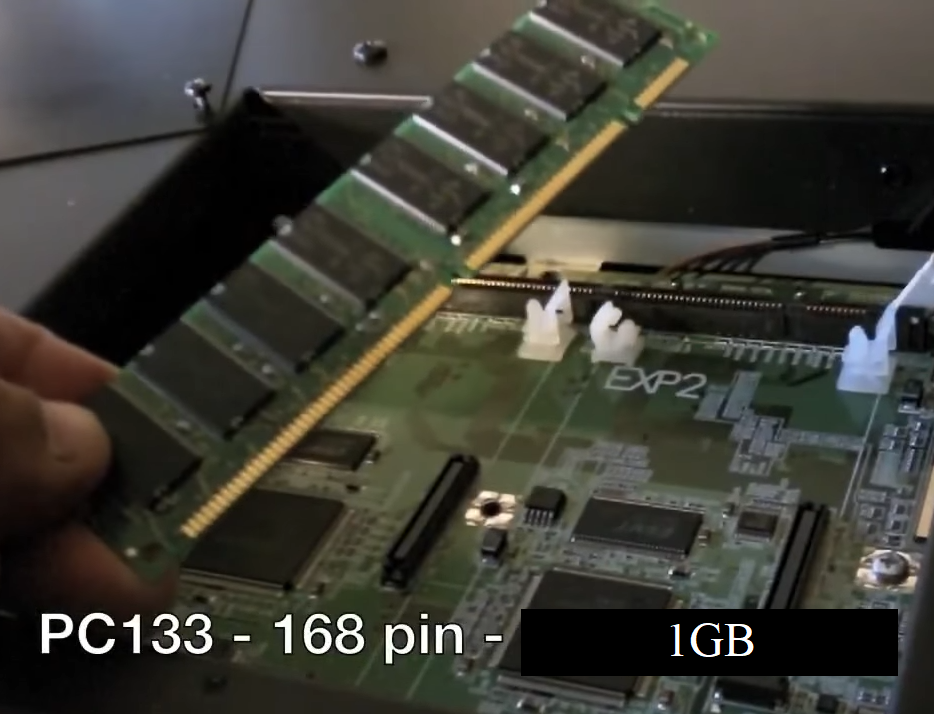
The original product instructions show a 1GB PC133, 168-pin DIMM installation example. Verify compatibility for your exact FANTOM model before buying memory.
Capacity Alone Is Not Enough
The module must be physically compatible, properly seated and recognized by the keyboard. After installation, open the FANTOM’s memory-information screen and confirm that approximately one gigabyte of sample memory is actually reported.
1024MB Sample Memory

This working FANTOM G screen reports 1024MB total sample memory after the one-gigabyte DIMM was installed.
Required Memory RecognizedCorrect 1GB DIMM Working

The working FANTOM X memory screen shows 1024MB total sample memory and installed card storage for loading the product.
DIMM and Card RecognizedCorrect 1GB DIMM Working

The working FANTOM XR memory display shows the installed one-gigabyte-class sample expansion and recognized card storage.
DIMM and Card RecognizedFANTOM G 2008 Workstation

- System Update Version 1.50 installed
- Correct compatible 1GB DIMM installed
- One gigabyte of sample RAM available
- At least a 1GB USB flash drive
FANTOM X 2004 Workstation
- System Update Version 2.10 installed
- Correct compatible 1GB DIMM installed
- One gigabyte of sample RAM available
- A 1GB-or-larger CF card installed
FANTOM XR 2004 Rack Module
- System Update Version 2.02 installed
- Correct compatible 1GB DIMM installed
- One gigabyte of sample RAM available
- A 1GB-or-larger CF card installed
Critical FANTOM G, X and XR Warning
Classic DIMM Sample RAM Is Volatile
The loaded samples do not remain inside the Classic FANTOM after shutdown, restart, power cycling or an interruption of electrical power.
Power Off the FANTOM and the Loaded Samples Are Lost
As documented for the FANTOM G, X and XR, expandable DIMM sample RAM is volatile. You must reload the Gospel Sound Pack after every shutdown, restart, power cycle or power interruption.
Transfer and load the library from USB or CF storage into DIMM sample RAM.
The sounds remain available while the keyboard stays powered and the sample RAM remains active.
Shutdown, restart, accidental unplugging or a power interruption clears the DIMM memory.
The samples must be loaded again before the sounds can be used.
Compare Before Purchasing
Modern Versus Classic FANTOM
These products share core Gospel sounds but are not interchangeable between hardware generations.
| Detail | Modern 2019 FANTOM | Classic FANTOM G / X / XR |
|---|---|---|
| Supported models | FANTOM-6, FANTOM-7 and FANTOM-8 | FANTOM G, FANTOM X and FANTOM XR |
| Published sounds | Seven sounds | Three sounds, each with four velocity layers |
| Sample requirement | 748MB of built-in sample RAM free | Correct compatible 1GB DIMM installed and recognized |
| Storage media | 32GB-or-smaller USB drive formatted by FANTOM |
G: at least 1GB USB drive X/XR: 1GB-or-larger CF card |
| Firmware | Version 3.02 or newer |
G: 1.50 X: 2.10 XR: 2.02 |
| Power-off behavior | Follow the supplied modern installation workflow | Loaded DIMM samples are erased and must be loaded again |
| Price | $70 | $30 |
Hear Both Product Generations
Modern and Classic Overview Videos
Watch the overview for the exact FANTOM generation you own before placing an order.

Modern FANTOM Overview
Hear the seven-sound modern collection including the MKS-style pianos, Gospel Grand, S7 Grand, J-Pop Brass and polyphonic Hugo Bass.
Play Modern Overview ▶
Classic FANTOM Overview
Hear the four-layer Piano 1 Dry, EP 2 Chorus and Gospel Grand collection for the legacy FANTOM workstation family.
Play Classic Overview ▶Development History and Support Disclosure
How the Library Reached the FANTOM Platform
The current page’s porting history and hardware-support limitations remain part of the product disclosure.
Developed First for Yamaha. Ported to FANTOM.
The underlying Gospel Sound Pack library was developed primarily for Yamaha MONTAGE and MODX hardware.
Software created by Chicken Systems, Inc. and Roland was then used as part of the process of porting the library to the supported Roland FANTOM series.
Hardware Support Is Limited
Wise Sound states that it does not own the listed Roland FANTOM hardware and therefore cannot provide detailed FANTOM hardware support beyond the instructions supplied with the product.
Read Before Checkout
Compatibility and Digital Product Policy
Confirm the edition, exact hardware model, memory, firmware and storage media before purchasing.
Digital Downloads Are Non-Refundable
Purchase only after confirming every listed requirement. The Modern and Classic editions are separate products, and buying the wrong edition or using incompatible memory does not make the product refundable.
Terms, License and Order Management
Secure ordering and digital delivery are handled through SendOwl. Review the current Wise Sound Terms and End User License Agreement before purchasing.
Does the Modern Edition work on the FANTOM-06, 07 or 08?
No. The published Modern Edition is specifically for the 2019 flagship FANTOM-6, FANTOM-7 and FANTOM-8.
Can the Classic Edition fit into 512MB of DIMM RAM?
No. The Classic library is approximately 564MB. Wise Sound retained the intended sound quality instead of reducing it to fit a 512MB setup.
Is any random 1GB memory module acceptable?
No. The DIMM must be compatible with the exact FANTOM model, correctly installed and recognized by the workstation. Verify the memory-information screen before purchasing.
How do I know the DIMM is working?
Open the keyboard’s memory-information screen and confirm that approximately one gigabyte of sample memory is displayed, similar to the working screenshots shown on this page.
Do Classic FANTOM samples remain after power-off?
No. FANTOM G, X and XR DIMM sample RAM is volatile. The library must be loaded again after shutdown, restart, power cycling or a power interruption.
What storage media does each Classic model need?
FANTOM G requires at least a 1GB USB flash drive. FANTOM X and XR require a 1GB-or-larger CF card installed.
Does Wise Sound provide detailed FANTOM hardware support?
Support is limited to the supplied product instructions. Wise Sound does not own the listed FANTOM hardware and cannot provide detailed hardware troubleshooting outside the documented installation process.
Select the Edition Matching Your Hardware
Purchase the Correct FANTOM Version
The two products are not interchangeable. Review the final hardware check under your edition before continuing to checkout.
2019 FANTOM-6 / 7 / 8
Modern FANTOM Edition
Seven sounds designed for the 2019 flagship FANTOM platform.
$70FANTOM G / X / XR
Classic FANTOM Edition
Three four-layer sounds in a 564MB classic workstation package.
$30Secure ordering and digital delivery are provided through SendOwl. FANTOM Gospel Sound Pack is an independent Wise Sound product and is not affiliated with, endorsed by or sponsored by Roland Corporation. Roland and FANTOM names remain the property of their respective owners. Digital products are non-refundable and are subject to the current Wise Sound Terms and End User License Agreement.