
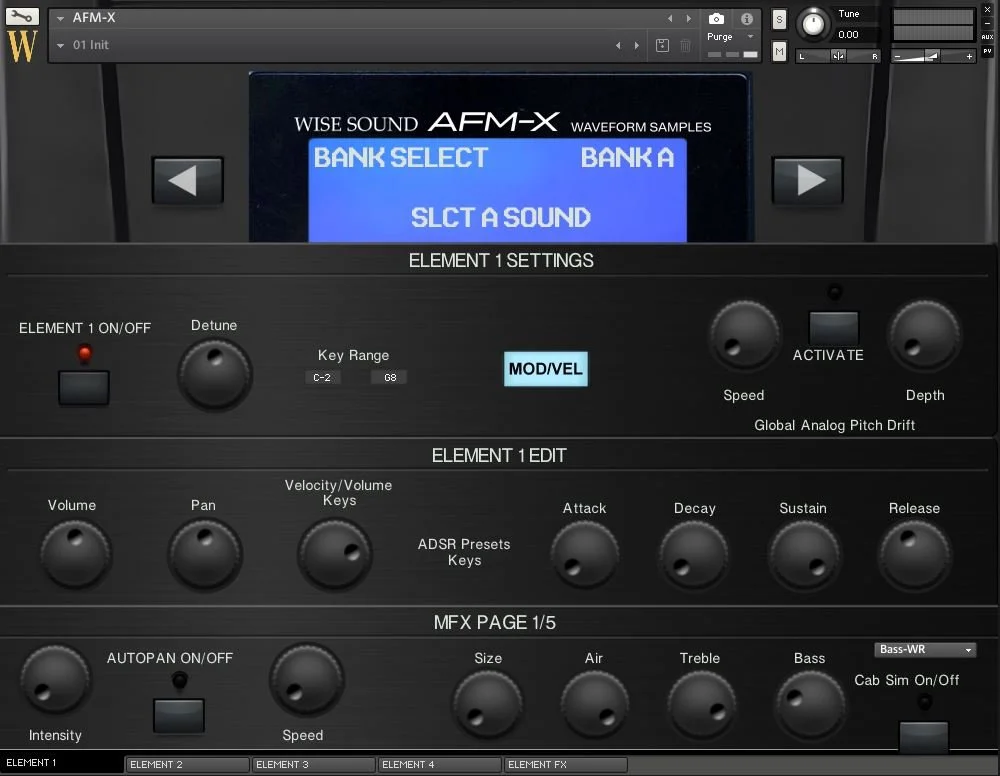
AFM-X
“Our Tribute to the Sound of the SY99 Era”
A deeply sampled Kontakt library featuring 38 individual sounds recorded from the SY99—including expressive electric pianos, synths, pads, strings, bells, brass and performance layers inside the four-element Wise Engine.
Requires Kontakt Full 6.7.1 or newer, including Kontakt 7 Full and Kontakt 8 Full. It does not work in the free Kontakt Player.
The Most Ambitious FM Workstation
The Sound Behind AFM-X
AFM-X celebrates the unusually rich sound palette created when advanced FM synthesis and sampled PCM waveforms were combined inside one flagship workstation.
Inspired by a Legendary Synthesis System
The SY99 combined Advanced FM synthesis, its AWM2 sample engine and Real-time Convolution and Modulation technology. The result was a collection of layered, dynamic and highly distinctive sounds.
AFM-X captures selected factory, user and community sounds directly from the instrument and rebuilds them as deeply sampled Kontakt instruments.
Complex electric pianos, digital synths and expressive timbres associated with the flagship FM era.
Sample-based attacks, pads, strings and supporting waveforms blended with distinctive digital textures.
Selected sounds were recorded across the keyboard and rebuilt for expressive playback inside Kontakt.
Four-part layering, splits, effects, snapshots, pitch drift and flexible performance controls.
Thirty-Eight Deeply Sampled Sounds
The Complete AFM-X Sound Collection
The library is led by eighteen electric pianos and expanded with synths, pads, strings, brass and supporting workstation textures.
Electric Pianos
Dynamic FM, tine, digital and hybrid electric-piano sounds.
Synth Sounds
Leads, basses, clav-style sounds and atmospheric digital synth textures.
Pads and Strings
Cinematic, glassy and layered textures for worship, scoring and performance.
Woodwind and Brass
Distinctive workstation-era supporting sounds and performance colors.
Electric Pianos 18
- 1983 EP
- 76 Stage EP
- Dream Tine
- DryHawk
- Duke EP
- EP: NiteHawk
- EP: Lovin
- FM Dyno
- FullTine
- Galaxy EP
- Knock Tine
- Nylon EP
- NY Tine
- Pro Rhodes
- Robbie B.
- FM S.A.E.P.
- FM Wurli
- Xpress Tine
Synths 10
- Comp Clav
- Danger Zone
- FM Harmonica
- KY: Smokey
- ME: Phantom
- Matrix6
- Moog Me
- Procsd Bs
- SP: Skylane
- SY-Clops
Pads and Strings 8
- 1AFM Soundtrack Pad
- 16-Bit Pad
- Itopian
- OberPad
- SP: Crystal
- SP: Elegant
- ST: Concert
- Vox Layer
Woodwind and Brass 2
- House Brass
- Pan Pipes

More Than 60 Snapshots
Kontakt snapshots recall complete AFM-X setups, including individual sounds, electric-piano combinations, synth layers and four-element performance patches.
- Organized snapshot categories
- Single sounds and stacked combinations
- Four-element layers beyond the original hardware
- Save and recall your own user presets
The Instrument Behind the Sounds
The Four-Element Wise Engine
Layer, split, shape and process four independent sounds inside one custom Kontakt instrument.
Four Elements. One Complete Performance.
Choose a sound for each element, define its keyboard range, adjust its response and process it independently. Empty elements load no samples, keeping the instrument efficient when fewer layers are required.
Layering and Splits
Stack up to four sounds or assign separate key ranges to create performance zones.
Per-Element Controls
Edit detune, key range, volume, pan, velocity response and complete ADSR settings.
LFO Routing
Assign LFO control to the modulation wheel or aftertouch and adjust global LFO rate.
Analog Pitch Drift
Add subtle global pitch movement for an immediate vintage digital-synth feel.
Master Effects
Access autopan, cabinet processing, flanging, chorus, portamento, delay and multiple reverb types.
Per-Element Effects
Process individual elements with chorus, delay, lo-fi, equalization, distortion and stereo spread.

LFO and Velocity Controls
Route performance control to the modulation wheel or aftertouch and shape the global velocity curve.
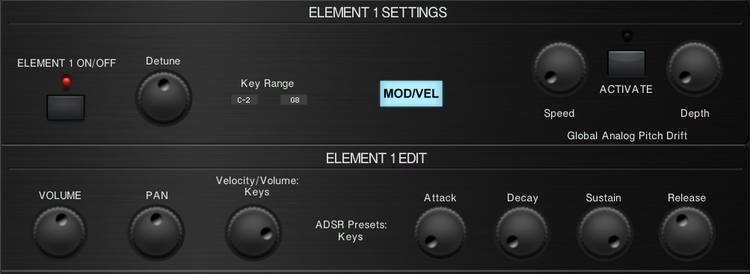
Individual Element Editing
Set the key range, tuning, volume, pan, velocity response, pitch drift and ADSR envelope.
Captured from the Original Instrument
SY99 Impulse-Response Reverbs
AFM-X includes convolution reverb and cabinet impulse responses designed to preserve more of the space, texture and effect character associated with the source instrument.

More Than Just Dry Sample Playback
The convolution module allows AFM-X to apply impulse-response reverbs and cabinet responses captured from the SY99 alongside the wider Wise Engine effects system.
Five master-effects pages place modulation, portamento, convolution reverb, plate reverb and delay directly inside the instrument.
Convolution spaces created from the source instrument.
Cabinet impulse responses and tone-shaping controls.
Smooth pitch movement for solo sounds, chords and layered patches.
Plate reverb and Replika-style delay for spacious performance patches.

Seven Per-Element Effect Types
Chorus, delay, lo-fi, two-band equalization, distortion, stereo spread and dedicated reverb.
Five Master-Effects Pages
Autopan, cabinet simulation, flanger, chorus, convolution, portamento, plate reverb and delay.
Performance-Conscious Architecture
Serious Resource Management
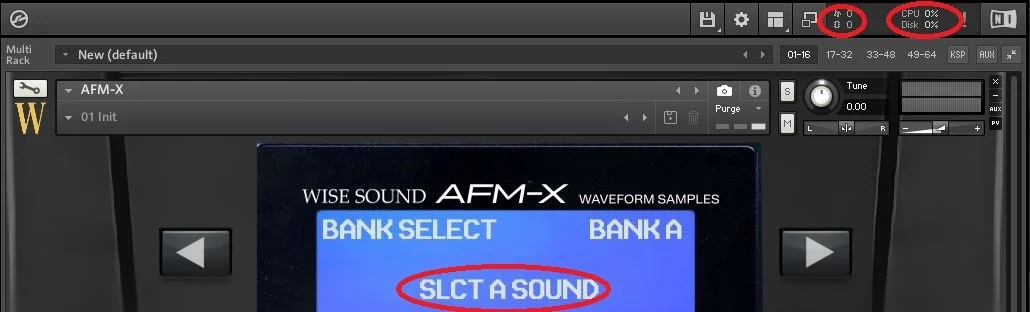
AFM-X loads only the sounds selected inside the four elements, preventing unused sample content from occupying system memory.
Select a Sound. Load Only That Sound.
Each element loads its selected sample content independently. An empty element loads no samples and uses no sample RAM.
One-Click Managed Delivery
Install AFM-X Through Pulse
Redeem the supplied product key, choose your preferred installation drive and allow Pulse to download, verify and extract the complete AFM-X library.
Download Once. Access It Again.
Pulse replaces temporary browser links with a dedicated application for redeeming, installing, updating and re-downloading your library.
Complete the $30 purchase and receive the product delivery information.
Download the free Pulse application and sign into your account.
Select Add a Product and enter the supplied redemption key.
Select an internal or external SSD and let Pulse complete installation.
See and Hear the Library
AFM-X Overview
Hear the sounds, see the interface and explore the four-element workflow before purchasing.

Official Product Walkthrough
Hear AFM-X Before You Buy
Watch the official overview for a closer look at the sound selection, interface, snapshots, element controls, effects and performance workflow.
Play Overview ▶Read Before Purchasing
Compatibility & Requirements
Confirm that you own Kontakt Full and have sufficient storage and memory before purchasing.
This Is Not a Kontakt Player Library
AFM-X requires the paid Full version of Kontakt 6.7.1 or newer. It can also be loaded in Kontakt 7 Full and Kontakt 8 Full. Pulse handles delivery but does not replace Kontakt or make AFM-X compatible with the free Kontakt Player.
How to Install with Pulse
AFM-X is delivered through Pulse, then opened as a third-party instrument inside Kontakt Full.
- Install Pulse and sign into your Pulse account.
- Select Add a Product and enter the supplied redemption key.
- Choose a reliable internal or external SSD.
- Allow Pulse to download, verify and extract AFM-X.
- Open Kontakt Full and browse to the installed instrument folder.
Digital Delivery & Policy
This is a digital-download product. Confirm compatibility before purchasing and review the current Wise Sound policies and license.
- Digital products are non-refundable
- Delivery is handled through Pulse
- Redeemed products remain accessible through Pulse
- Commercial musical use is permitted under the EULA
Does AFM-X work in the free Kontakt Player?
No. AFM-X requires the paid Full version of Kontakt 6.7.1 or newer.
Can AFM-X be loaded in Kontakt 7 or Kontakt 8?
Yes. The same library can be loaded in Kontakt 7 Full and Kontakt 8 Full.
Should I add AFM-X through Native Access?
No. AFM-X is delivered through Pulse and opened through Kontakt Full’s Files browser or Quick-Load system.
Can I reinstall AFM-X later?
Your redeemed product remains connected to your Pulse account and can be installed again when needed.
Is AFM-X a complete SY99 software emulation?
No. AFM-X is a deeply sampled sound library and does not recreate the original hardware’s AFM, AWM2 or RCM synthesis architecture.
Can AFM-X be used in commercial music?
Yes. Finished musical works and performances are permitted under the Wise Sound EULA.
Raw samples and library files may not be redistributed, resold or used to create another sample library.
The Sound of the SY99 Era
Explore AFM-X for Only $30
Get 38 individual sounds, more than 60 snapshots, four editable elements, SY99 impulse-response reverbs, extensive effects and managed Pulse delivery.
Digital download delivered through Pulse. Kontakt Full 6.7.1 or newer is required. AFM-X is an independent Wise Sound product and is not affiliated with or endorsed by Yamaha Corporation.